


Why the 2026 Hyundai ELANTRA’s Dual 10.25-inch Displays Make Daily Driving in Norfolk, NE Feel Effortless
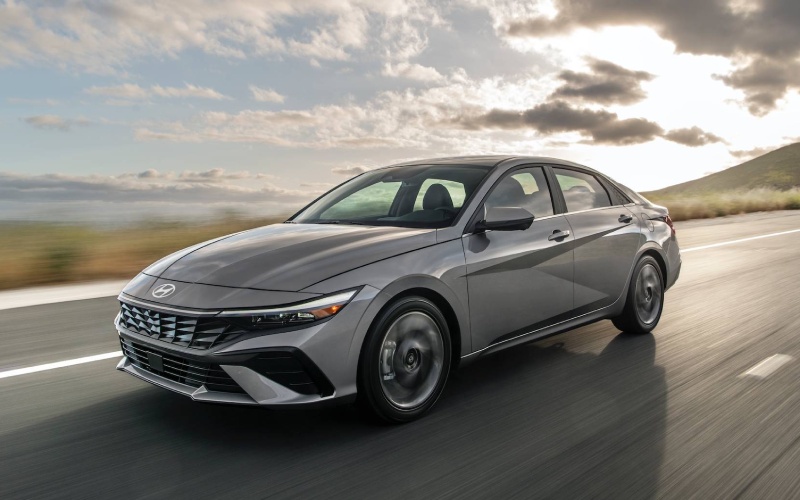
Vern Eide Hyundai Sioux City – Why the 2026 Hyundai ELANTRA’s Dual 10.25-inch Displays Make Daily Driving in Norfolk, NE Feel Effortless
The 2026 Hyundai ELANTRA is loaded with useful technology, but one feature instantly elevates the entire driving experience—the available dual 10.25-inch displays. When you combine a high-resolution touchscreen with navigation alongside a fully digital instrument cluster in a nearly seamless panel, everyday driving becomes simpler, clearer, and more intuitive. Around Norfolk, NE—where your week can include Highway 275 commutes, quick runs to Johnny Carson Boulevard, and weekend trips out toward the Elkhorn River—this layout keeps information precisely where you want it without overwhelm.
We appreciate that Hyundai focused on clarity and ergonomics as much as pixels. Menus are logically arranged, the map is genuinely easy to read at a glance, and the cluster is customizable so you can prioritize the data you want, whether that’s active safety status, turn-by-turn directions, or audio info. That kind of thoughtful design matters on unfamiliar detours or when the afternoon sun hits your windshield just right. You’re in control without distractions, which is exactly how tech should feel.
What makes ELANTRA’s dual displays feel “premium” in daily use
Many vehicles advertise big screens. Fewer get the fundamentals right: bright, crisp graphics, quick response to touch, and logical layouts that reduce taps. ELANTRA checks those boxes and goes further by blending the infotainment screen with the digital cluster, closing the visual gap where your eyes jump between vehicle info and apps. Add the available integrated navigation and you get a clean, panoramic interface that’s easy to scan, even during merging or lane changes on 25th Street or Benjamin Avenue.
- Readability: Clean fonts and high-contrast graphics reduce eye strain
- Responsiveness: Quick transitions and minimal input lag
- Customization: Configurable cluster views for maps, safety, and drive data
- Placement: Near-seamless panel keeps sightlines forward
There’s also a real benefit for shared vehicles. If someone else frequently drives your ELANTRA, the cluster’s personalization makes it simple to return settings to your favorites. Combine that with steering-wheel controls and it’s easy to tailor displays without digging through submenus. The result is the kind of daily usability that quietly improves every mile.
Wireless connectivity keeps your cockpit clutter-free
Even if you choose an ELANTRA with the standard 8-inch touchscreen, you still get wireless Apple CarPlay® and Android Auto™—a big plus when your day involves multiple short trips around Norfolk. No more juggling cords for quick grocery runs or school pickups. Your playlists, podcasts, and calls connect automatically, and you can keep your phone on the available wireless charging pad to top off the battery as you drive.
- Wireless Apple CarPlay®: Plug-free access to Maps, Music, and Messages
- Wireless Android Auto™: Streamlined Google Assistant, Maps, and media apps
- Charging Pad: Available Qi-compatible pad keeps devices powered
- 2nd-Row USB: Ports help passengers stay charged, too
For busy households, that combination of wireless integration and accessible charging reduces clutter and the small hassles that slow you down. It’s a thoughtful solution that feels “premium” because it disappears into your routine.
Smart safety visuals that support confident driving in town and on the highway
Hyundai SmartSense systems—like Lane Keeping Assist, Lane Following Assist, and Blind-Spot Collision Warning—are only as helpful as their alerts. ELANTRA’s digital cluster shows clear icons and status indicators, so you know what the system is seeing and when it is assisting. On Limited, Highway Driving Assist adds a new level of confidence for longer stretches on Highway 275, helping maintain following distance and assisting with lane centering through gentle curves.
- Clear Icons: Easy-to-understand safety status at a glance
- Lane Visualization: Helps confirm guidance during lane-centering
- Safety Alerts: Audible and visual cues work in tandem
- Highway Assist: Available support reduces fatigue on longer drives
When safety information is predictable and well placed, it feels less intrusive and more like a natural extension of your own awareness. That’s exactly how ELANTRA’s interface operates, and it’s a difference you feel in traffic.
Navigation that genuinely helps around Norfolk, NE
Local driving isn’t always about long distances—it’s about navigating small turns, new developments, and the best routings during events or construction. The available navigation system’s clean map design makes it easy to follow directions at a glance. Lane guidance is clear, voice prompts are well timed, and the routing adapts quickly. Whether you’re heading to a ballgame near Skyview Park or picking up friends on West Norfolk Avenue, the system does the little things right so you can focus on the road.
We also like how the dual-display setup enables natural “division of labor.” The center screen handles the route and media, while the cluster echoes turn-by-turn prompts and key info. You don’t have to choose between data points—both are visible in the right place at the right time.
Audio and UI design that elevate the experience
Pair the dual displays with the available Bose® Premium Audio and ELANTRA becomes an easy place to spend time. Podcasts sound crisp, and your favorite playlists have a warmth and presence that’s rare in the compact segment. Hyundai’s interface doesn’t bury basics either: climate controls are easy to find, and common audio and navigation functions stay near the top layer of the screen. That’s important when you’re changing destinations on the fly or answering a call.
It’s also worth noting that this tech arrives in a cabin that feels modern and cohesive. H-Tex® seating surfaces on select trims hold up well to everyday use and clean easily—great for real-world life that involves kids, pets, or gym bags. The overall effect is upscale without being fussy.
How to choose between ELANTRA’s display options
Both setups are excellent. If you prefer clean simplicity and wireless smartphone integration, the standard 8-inch touchscreen already delivers. If you want built-in navigation, a panoramic display feel, and a customizable digital cluster, the available dual 10.25-inch setup is the answer. Drivers who spend more time on the highway or regularly navigate to new destinations will especially appreciate the expanded screen real estate and quick-glance readability.
If you’d like help deciding which trim fits your routine, our team will walk you through the differences and set you up with a test drive so you can see both in action. Vern Eide Hyundai Sioux City is serving Des Moines, Ames, and Norfolk with clear guidance and a straightforward shopping process that keeps you in control.
Frequently Asked Questions:
Do I need the dual 10.25-inch displays if I mainly use my phone for maps?
No. The standard 8-inch touchscreen supports wireless Apple CarPlay® and Android Auto™, so you can run your preferred map app without plugging in. The dual 10.25-inch setup adds built-in navigation and a fully digital cluster, which is great if you want a more integrated, premium experience.
Is the digital cluster hard to learn?
Not at all. The menus are intuitive, and you can adjust settings with the steering-wheel controls. Most drivers get comfortable quickly because the cluster uses plain-language labels and clear icons.
Can I still use steering-wheel controls with the dual displays?
Yes. Core functions like audio volume, track selection, voice commands, and information toggles are all accessible from the steering wheel, minimizing distraction.
Which trims offer the dual 10.25-inch displays?
The dual-display setup is available on select ELANTRA trims. If you’re leaning toward SEL Sport Premium, Limited, or a comparable hybrid trim with navigation and the 10.25-inch digital cluster, you’ll find this layout offered there. We’re happy to confirm availability based on our current inventory.
The 2026 Hyundai ELANTRA’s dual 10.25-inch displays aren’t just a spec—this is tech that makes driving in and around Norfolk, NE easier, calmer, and more connected. Whether you’re heading down Highway 275 or crossing town for a quick errand, the interface is dependable and delightful in daily use. If you’re ready to see how the cockpit fits your routine, we can help you compare trims and get you behind the wheel for a true side-by-side look.
0 comment(s) so far on Why the 2026 Hyundai ELANTRA’s Dual 10.25-inch Displays Make Daily Driving in Norfolk, NE Feel Effortless